
- Interfaces
- Community
- Forums
 »
Buster 1440p All Purpose UI
PicturesFile Info
»
Buster 1440p All Purpose UI
PicturesFile InfoUpdated: 11-01-2025 05:48 PM Created: 10-29-2020 11:17 AM Downloads: 16,947 Favorites: 8 MD5: I see a real lack of 1440p UI's or they all follow the exact same formula.Buster 1440p All Purpose UI
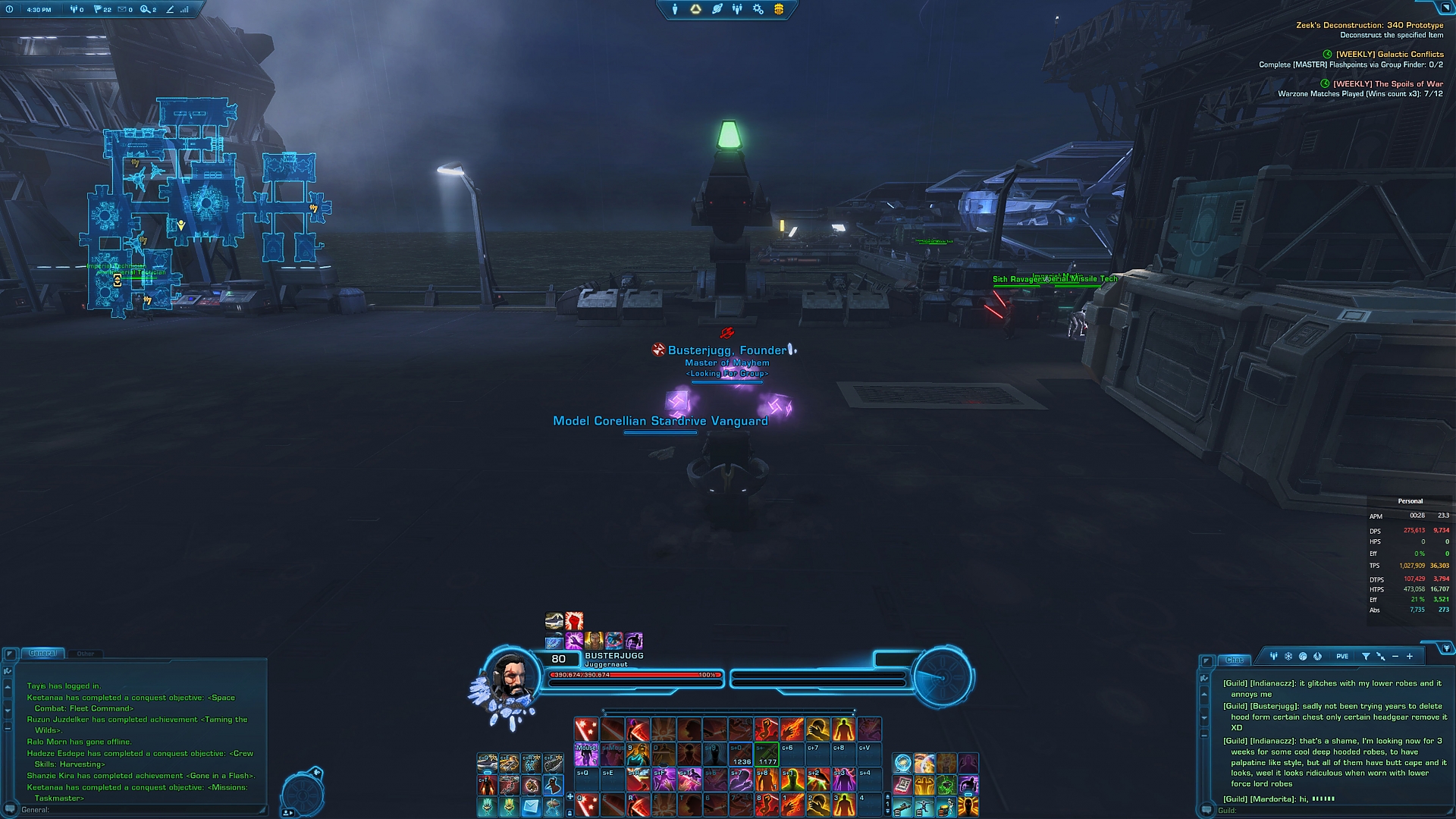
So I Decided to put my spin on it. This UI is optimized for 1440p monitors.
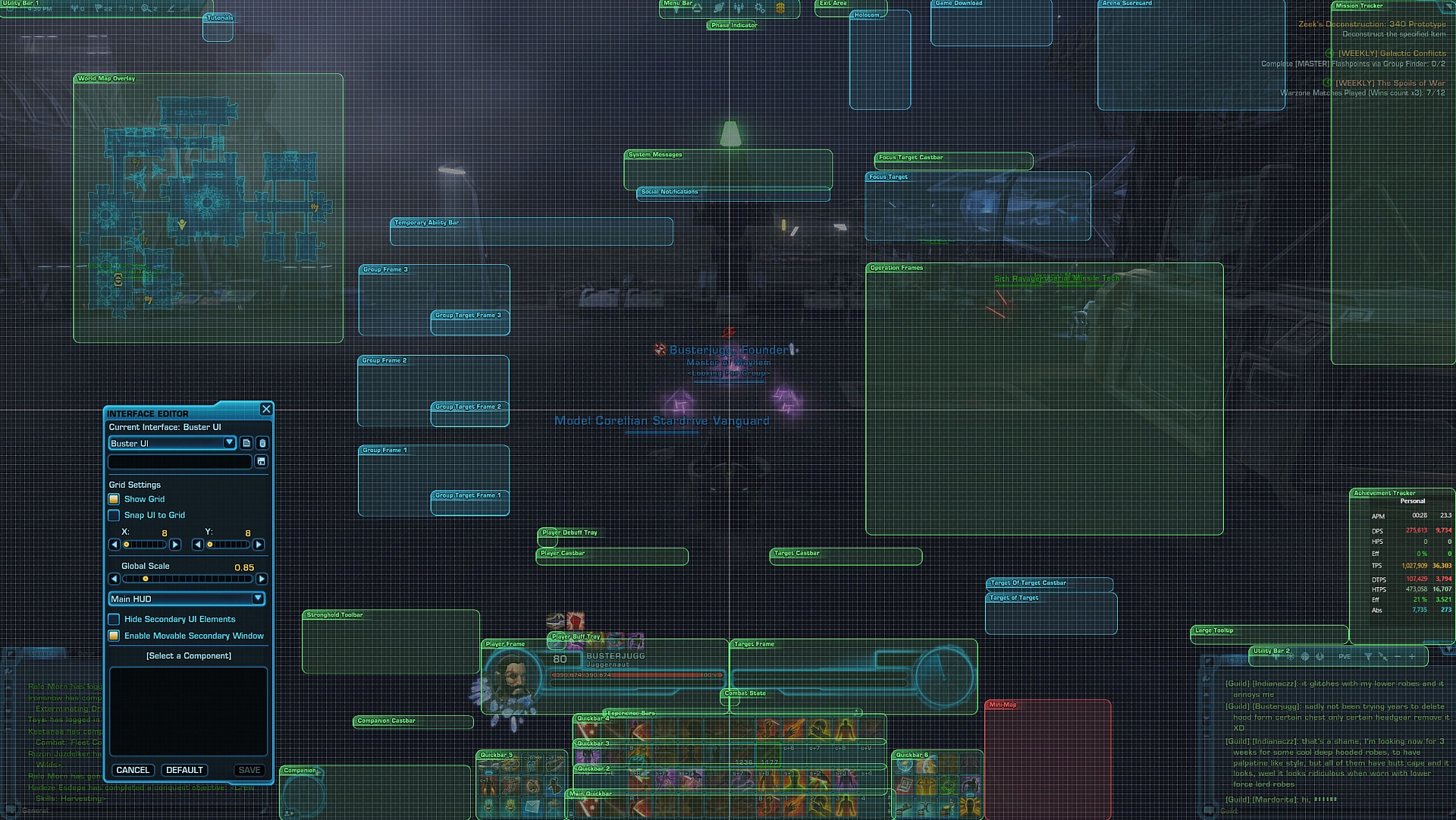
I have done some fine tweaking to the Main "Buster UI 1440p" layout but I have now included a overhauled "Buster UI 1440p Variant" and a third layout "Buster UI 1440p Target Variant"
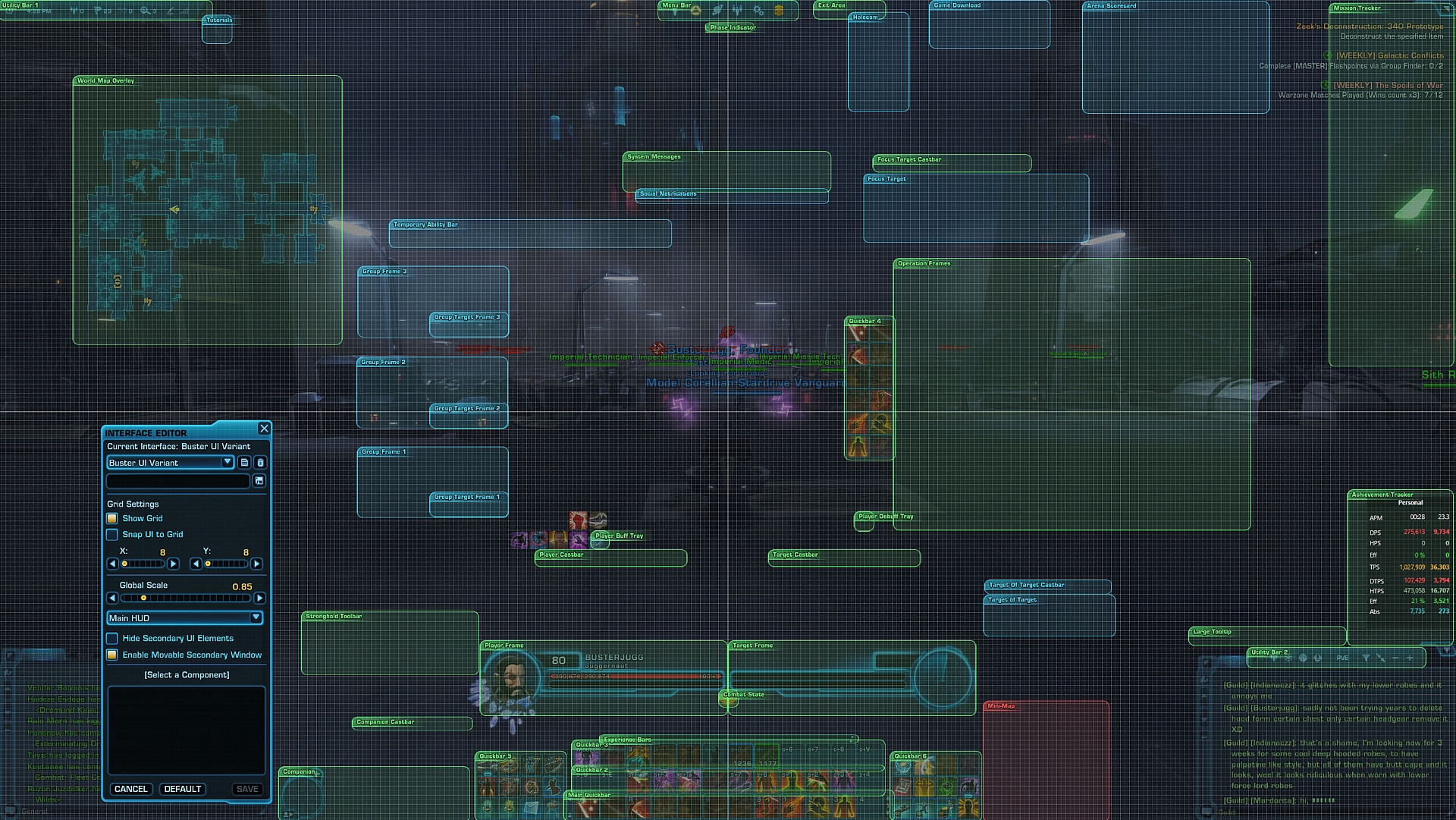
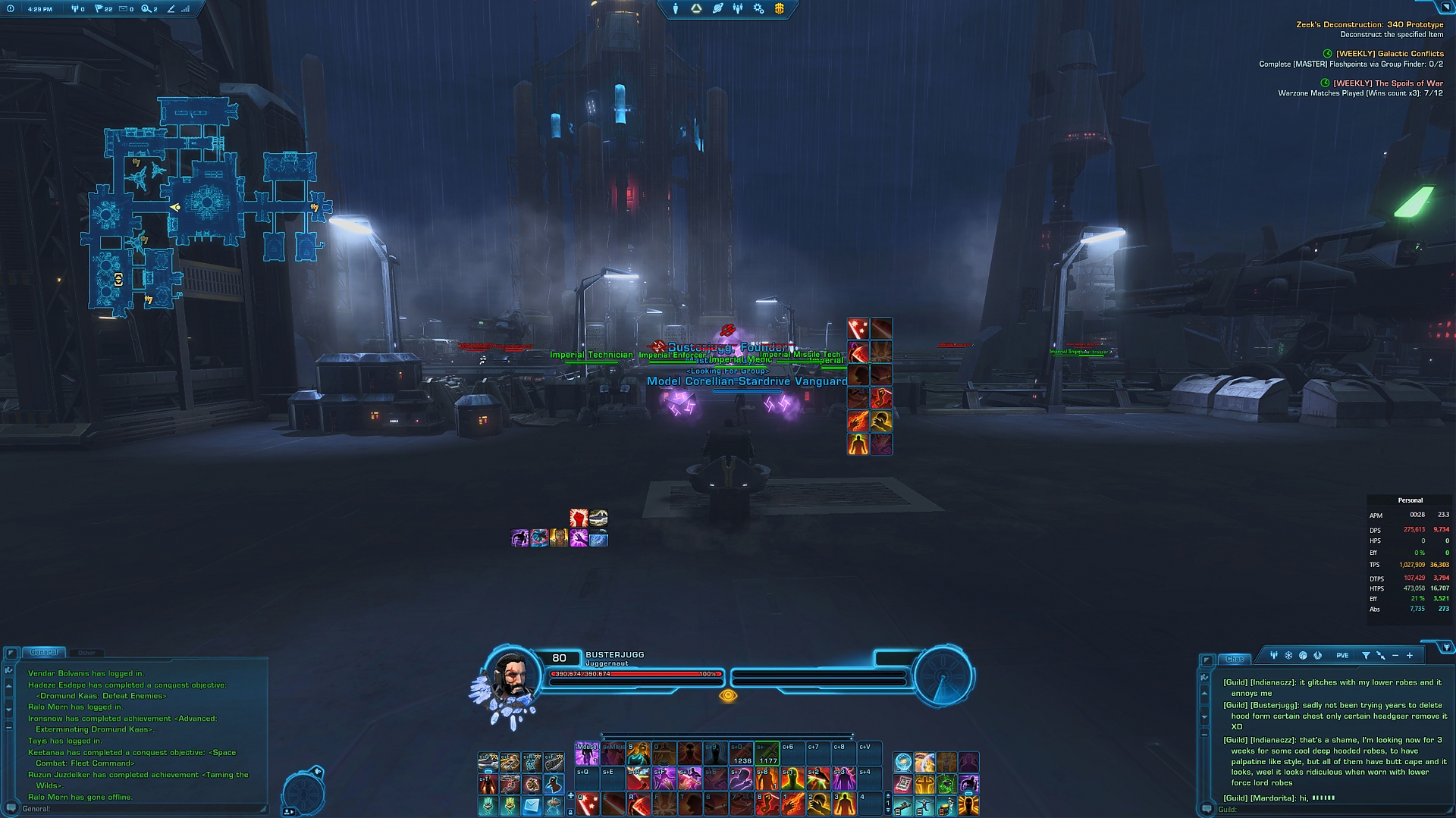
The new Variant had quick bar near the center of screen (slightly over center)
As good rule for all MMO you try put critical parts of UI near center of your screen so don't find eye away from center too often there for pulling attention away from mechanics.
I have implemented this "rule" into the variant duplicated my bar 1 with same abilities near center so I can track my ability Procs without pulling My eyes away from center of my screen giving more focus on mechanics. Also done same thing debuff and buffs bars.
I have also created 3rd variant to further achieve this new rule of important UI being near the center. with target frame in it's new postion for class like annilation/watchman where need keep eye on dots make sure refresh in time. this keep your eye center.
You now have choice which to install so make sure drag right UI file into the location. Or you can install all files and pick between them ingame.
"Buster UI 2025" is the original and "Buster UI 2025 Variant" is the new version. There is now 3rd version called "Buster UI Target Variant 2025"
Hope everyone enjoys playing around with both UI's and the new Variant
It is worth noting I prefer use Target Variant, it isn't to disruptive to immerisve middle screen but give a easy place to watch target HP and Procs to stop staring at the hotbar. Once I memorized a rotation. I leave the target bar where is but hide the hotbar (if the class not to proc reliant)
This has no real changes other minor tweak but is now 2025 checked for any needed UI placement changes and is now ready go for new year.14/10/2021
Updated some frame sizes/postion to fix some overlap
Swapped Group frames and Op's positions since op frames fill from left this allow better visibility in 4-8 man content.
14/03/2024
No major change or frame move just reloading to ensure any subtle change they might done update are reflected. Also adjusted key bind file to suit my evolved needs.
17/03/2024
Redid my Keybinding quite massively which lead restructure quickbars.
18/03/2024
Made a whole new more center focused UI called "Buster UI 1440p Variant" included it in the zip file. So there are now 2 UI's.
19/03/2024
Dialed in location of mid screen hotbar a little more try obsurce as little as possible in center
22/03/2024
Buster UI: Move the debuff to more central location for the eyes. I have also try to be really pinpoint accurate with location of Player and target Frames.
Buster UI: Variant Move Buff and debuffs to more Central location to help with keep focus on middle of screen. I have also try to be really pinpoint accurate with location of Player and target Frames.
02/04/2024
I have swapped the debuff and buff bars so that you eyes can stay center with buff next to the hotbar.
The Big new addtion is 3rd UI,m all bundle in. It is called the "Buster UI Target Variant" This move the target frame up way more center the screen. Again to achieve goal of keeping the important information in center screen so don't pull your eyes away.
You can pick which UI you use by either installing them all and picking or installing on the one you want.
02/04/2024 (PM) Fine Tuning the UI element placement to be more precise.
18/01/2025 just checked ui for any possible new elements and ensured it is 2025 ready
01/11/2025 Added a No Proc hotbar variant with Target frame still high mid screen as option.Optional Files (0)
Archived Files (12)File NameVersionSizeAuthorDate3.422kBbesaidbuster01-18-2025 08:13 PM3.222kBbesaidbuster04-02-2024 09:12 AM3.122kBbesaidbuster04-02-2024 03:52 AM3.022kBbesaidbuster04-01-2024 05:22 PM2.317kBbesaidbuster03-22-2024 05:18 PM2.217kBbesaidbuster03-22-2024 10:46 AM2.117kBbesaidbuster03-18-2024 08:32 AM2.017kBbesaidbuster03-17-2024 07:53 PM1.711kBbesaidbuster03-17-2024 07:49 AM1.6B11kBbesaidbuster03-15-2024 04:50 AM1.6A11kBbesaidbuster03-14-2024 04:46 AM1.612MBbesaidbuster04-09-2023 08:28 AM

Comment Options  06-26-2025, 05:02 AM
Forum posts: 0File comments: 1Uploads: 0Keybind port
Great UI, was wondering if you had a keybind file i could import

 04-23-2025, 04:56 PM

Forum posts: 0File comments: 2Uploads: 1Re: Keybinds for all skills
Hi! What do you mean by "skill layouts"?Quote:Originally Posted by PalriumHi buster im new to swtor and wanted to know if you have able to post pictures of Skill layouts for the ui if its no trouble
If you mean the skill order, based on the screenshot, my bottom-most bar follows these basic keybindings: Q, E, R, F, T, along with 6, 7, 8 (mouse binds) and 1, 2, 3, 4. The second bar uses the same keys but with Shift, and the third bar is similar but with Ctrl. This third bar also includes middle mouse button bindings: middle mouse, Shift + middle mouse, Ctrl + middle mouse, and mouse buttons 6, 7, 8, 9, 0, -.
I’ve designed my hotbars around a simple rule to make learning new characters easier:
My main rotation (1-2-3 combo sort skills) is assigned to Q, E, R.
Rotational cooldowns (6-15 seconds) are on F and T, though I rearrange them as needed.
Mouse buttons 6, 7, 8 are prioritized for proc-based skills or skills that create ground effects (e.g., Sniper Engineer AoEs or Crushing Blow procs for Juggernaut).
For AoE moves:
Shift + Q, E, R are set for AoE abilities.
Shift + F, T are prioritized for AoEs or short cooldowns (~30 seconds).
Shift + mouse buttons 6, 7, 8 handle longer cooldowns or finishers.
1, 2, 3, 4 are for interrupts or crowd control (CC) skills.
Shift + 1, 2, 3, 4 are for cooldowns (CDs).
Long cooldowns go on mouse buttons 9, 0, -.
I know that’s a lot to take in, but these rules allow me to map new characters quickly and consistently without disrupting my muscle memory. If you look at my screenshots (outside of Layout Mode), you can see the ability bars as a rough example.
For my variants:
I have a hotbar in the center of the screen for proc-based abilities. I recreate my main hotbar (the bottom-most one) but remove non-tracked skills. I make sure any class-specific skills that proc or reset are on this bar to avoid having my eyes glued to the bottom of the screen.
I know that is alot of word vomit, but I hope it makes sense.
02-02-2025, 03:27 AM
Forum posts: 0File comments: 1Uploads: 0Keybinds for all skills
Hi buster im new to swtor and wanted to know if you have able to post pictures of Skill layouts for the ui if its no trouble
07-06-2024, 01:23 PM
Forum posts: 0File comments: 2Uploads: 1Glad
I am glad it inspired, I am abit of UI preferectionist, particular in pratical sense. I beleive UI is window to game, if the UI wrong it can 180 an experience.
So I am glad all UI nerding paid off
04-28-2024, 02:16 AM
Forum posts: 0File comments: 1Uploads: 1Pretty
Looks great, i got some inspiration, because i use my own UI build i posted couple of years ago here and now it's of course optimalized for nowadays updates, but have seen some nice modification i would use.... Great job




 if its no trouble

Swtorui
AddOn Sites

© 2022 MMOUI